

The Role of Videos in Google Business Profiles and How to Add Them
Introduction to Videos in Google Business Profiles
A Google Business Profile (GBP) is one of the most powerful digital assets for any local business. Formerly known as Google My Business, GBP appears prominently in Google Search and Google Maps whenever someone looks up your business name or searches for services near them. For many users, this profile becomes the business’s front door online—often seen before the website, social media, or ads.
Because of this visibility, an optimized Google Business Profile plays a critical role in local SEO, credibility, and conversions. It helps customers quickly understand what you offer, where you’re located, and whether you’re a good fit for their needs. This is especially important for local and service-based businesses that rely heavily on nearby search traffic.
Beyond basic details like name, hours, and reviews, Google increasingly emphasizes rich media within GBP—photos, posts, and especially videos. Videos provide a dynamic, engaging way to showcase your space, services, team, and personality. When used strategically, they can influence click-through rates, calls, direction requests, and website visits, making them a valuable but often underused tool in local marketing.
How Videos Appear on Your Google Business Profile
Videos uploaded to your Google Business Profile can appear in several places, including the Photos/Videos tab, the overview media carousel, and within Google Maps results. On mobile devices—where most local searches happen—videos are especially prominent and easy to access with a tap.
Users may encounter your videos when searching your business name directly or when discovering your listing through a broader local query. Google allows viewers to filter between business-uploaded content and user-generated media, meaning your own videos help you control the first impression rather than relying solely on customer uploads.
Because only a handful of photos or videos appear before users scroll or click “more,” the quality and relevance of your earliest visible assets matter most. Strong thumbnails, clear visuals, and recognizable branding increase the likelihood that users will watch your videos and then take meaningful actions like calling, booking, or requesting directions.
Why Google Encourages Visual Content—Especially Video
Google’s search experience has steadily shifted toward visual and interactive formats. Image packs, video carousels, and immersive map results now dominate many local searches. This reflects Google’s goal of helping users make faster, more confident decisions with minimal effort.
Video excels at this. In just a few seconds, a video can communicate atmosphere, professionalism, trustworthiness, and value—things that text alone struggles to convey. While Google doesn’t state that videos are a direct ranking factor, it consistently rewards complete, engaging profiles that help users find what they need quickly.
Videos reduce uncertainty. They show real people, real locations, and real services, helping users feel comfortable choosing your business. That alignment with user satisfaction is exactly what Google aims to promote.
The Business Impact of Videos on GBP
Influencing User Behavior and Engagement
Videos naturally attract attention and keep users engaged longer than static text or images. When visitors watch a video on your profile, they are more likely to continue interacting—checking reviews, clicking to your website, calling, or saving your business.
Seeing your space, staff, or service in action helps potential customers imagine themselves working with you. This visualization nudges them closer to a decision and often results in higher-quality inquiries, as expectations are clearer from the start.
Local SEO and Visibility Benefits
Although videos are not an official ranking signal, profiles with richer media often experience stronger engagement. Higher engagement—more clicks, calls, and interactions—correlates with better visibility in competitive local markets.
Videos also differentiate your listing. In search results where competitors rely only on text and basic photos, a well-produced video can immediately set your business apart and make your profile feel more complete and trustworthy.
Trust, Credibility, and Brand Personality
Video humanizes your business. Showing your team, your process, and your environment builds authenticity. Customers are more likely to trust a business they feel they’ve already “met.”
Consistent branding across videos—tone, visuals, messaging—also reinforces identity. Even small businesses can appear polished and professional by maintaining a cohesive video style that reflects their values and local presence
Types of Videos You Can Add to Your Google Business Profile
Business Overview and Welcome Videos
A welcome video introduces who you are, what you do, where you’re located, and why customers should choose you. These videos should be friendly, concise, and focused on first impressions. Shots of your storefront, interior, team, and signage help ground the message visually.
This type of video often becomes the anchor content on your profile, setting expectations for everything else users see.
Product and Service Demonstrations
Demo videos show how your product works or what a service looks like in action. These are especially effective for reducing doubt and educating prospects. Real staff performing real work in real settings builds credibility far more than overly polished studio footage.
Short, focused demos tend to perform best on GBP, where users are browsing quickly rather than watching long tutorials.
Behind-the-Scenes and Culture Videos
Behind-the-scenes content highlights preparation, quality control, teamwork, and values. These videos build transparency and relatability, helping customers feel connected to the people behind the business.
They can also support hiring efforts by showing what it’s like to work with or for your company.
Customer Testimonials and Case Studies
Video testimonials add powerful social proof. Hearing real customers describe their experience feels more believable than text alone. Guided questions help capture specific, story-driven responses rather than vague praise.
Case-study style videos—showing a problem, solution, and result—are particularly effective for services, trades, and professional industries.
FAQ and Support Videos
FAQ videos address common questions about hours, parking, booking, accessibility, pricing ranges, or processes. Visual walkthroughs make customers feel prepared and reduce repetitive inquiries.
These videos signal helpfulness and can be repurposed across your website and social channels for added value.
Google’s Technical Requirements and Content Policies
Google typically supports formats like MP4 and MOV, with reasonable file sizes and standard resolutions. While exact limits may change, shorter videos—often under two minutes—perform best for GBP viewers.
Videos should be stable, well-lit, and clearly focused on the business. Shaky, blurry, or irrelevant footage may underperform or be rejected. Content must comply with Google’s policies, avoiding misleading claims, inappropriate material, or spammy tactics.
Privacy matters. Always obtain consent before featuring identifiable customers or staff, and be especially cautious when filming minors or sensitive environments. Accessibility is also important—on-screen text or captions help viewers watching without sound and support inclusive experiences.
Planning a Video Strategy for GBP
Start by defining your goals. Are you trying to increase calls, bookings, foot traffic, or reduce common questions? Each goal suggests different video types.
Next, understand your audience. Their concerns—price, speed, comfort, safety—should shape your messaging. Map videos to the customer journey: awareness videos introduce your business, consideration videos explain services, and decision-stage videos build trust through testimonials.
Treat video creation as ongoing, not one-time. Even one new video per month can keep your profile fresh and signal activity.
Filming and Editing Best Practices
Modern smartphones are more than sufficient for GBP videos. Focus on good lighting, stable shots, and clear audio. Natural light, a simple tripod, and filming in quiet environments go a long way.
Editing doesn’t need to be complex. Trim mistakes, tighten pacing, and add subtle branding or on-screen text where helpful. Keep videos concise and lead with the most important information to hook viewers quickly.
Export in a standard resolution (like 1080p) and common formats to ensure smooth playback across devices.
How to Add Videos to Your Google Business Profile
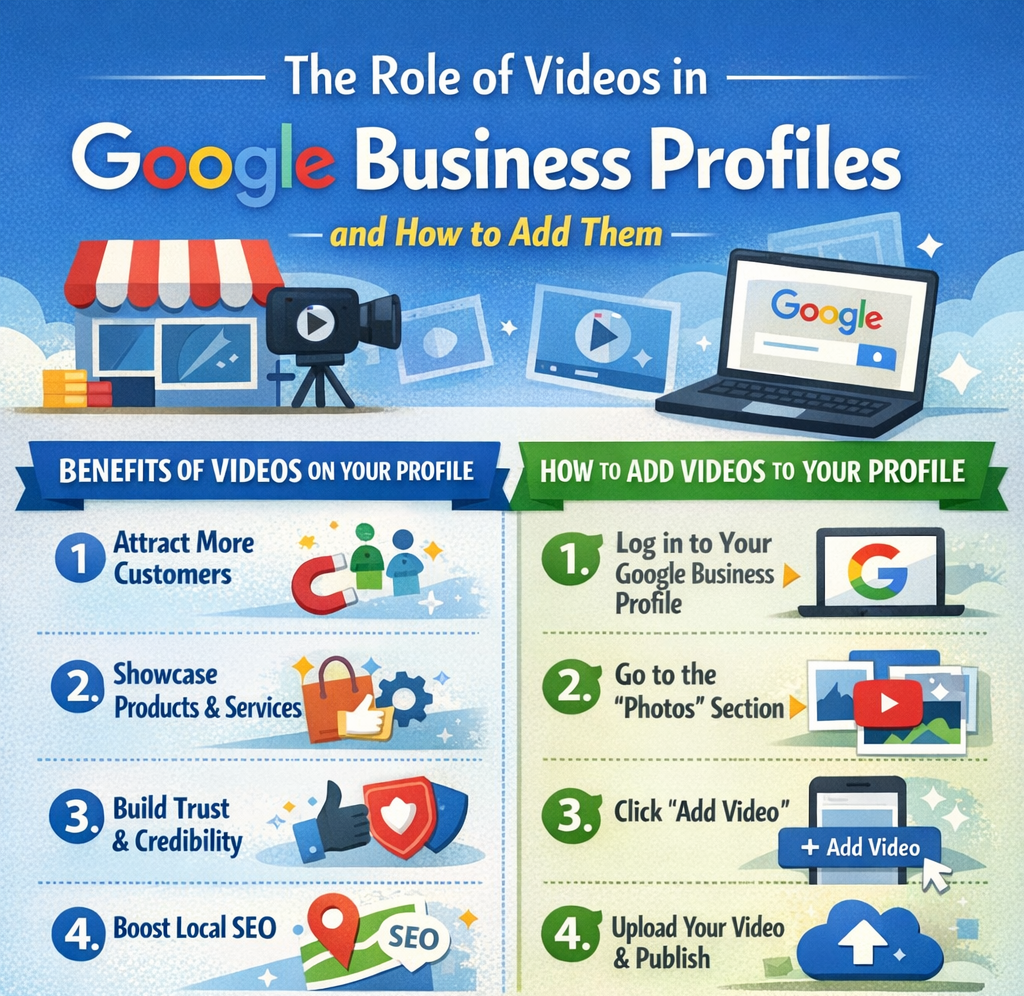
Log into the Google account that manages your business profile and access the dashboard via Search or Maps. Navigate to the Photos or Photos & Videos section and upload your video files from desktop or mobile.
After uploading, allow time for processing and verify that videos display correctly on both desktop and mobile. If a video doesn’t appear, check format requirements or policy issues and re-upload if necessary.
Optimizing Videos for Maximum Impact
Use any available titles or captions to clearly describe what each video shows. Incorporate keywords naturally—service type and location—without stuffing.
Align videos with your core services and encourage action with soft calls-to-action like “Call us via this profile” or “Tap Directions to visit us.” Refresh videos periodically to reflect changes in services, branding, or seasons.
Monitor customer-uploaded videos as well, reporting inappropriate content and learning from authentic feedback.
Measuring Performance and Improving Over Time
Google Business Profile Insights provides data on views, calls, direction requests, and website clicks. While video views aren’t always separated, changes in engagement after adding videos can indicate impact.
Track metrics before and after uploads, and listen for qualitative feedback from customers or staff. Use these insights to refine future content, focusing on what resonates most.
Conclusion
Videos are a powerful, often overlooked asset within Google Business Profiles. They help businesses stand out in local search, communicate value quickly, and build trust before a customer ever visits or calls. With thoughtful planning and basic production practices, even simple smartphone videos can significantly improve engagement, credibility, and conversions.
By setting clear goals, creating customer-focused content, following Google’s guidelines, and reviewing performance regularly, businesses can turn GBP videos into a living, evolving part of their local marketing strategy—one that continues to deliver value over time.

